
How is HTTPS secure?
Romantic story between two computers on the internet and how their first date goes.

Does S in HTTPS stand for secure? I will tell you a little later.
HTTPS is not a separate protocol from HTTP. It is simply using TLS/SSL encryption over the HTTP protocol. First, we need to understand how HTTP works.
How can your computer communicate with a bank server and make some transactions with the application on the internet?
Computer network 101
Suppose you use a website or application not running on a local server. In that case, it has to talk to a server on another computer connected via the internet (or intranet sometimes). When two computers on the internet have to speak to each other, making this communication secure is essential so that no unknown interceptor can eavesdrop or modify the information for their benefit.
A connection is established between the browser and the server on the internet using HTTP protocol. After a communication path is established, the data transmission happens using one of the protocols called Transmission Control Protocol (TCP). The browser and server use this TCP protocol so that the data is never lost and resent when lost. The TCP layer doesn’t care about security as the connection already happens through an encrypted connection which means the data transferred by TCP is already encrypted on the wire. Now, we know how computers on the internet share data between them.
HTTP connection
But the HTTP connection is still a black box. Let’s dive in to understand it.
A GET request in HTTP looks like this:
GET /hello.txt HTTP/1.1
User-Agent: curl/7.63.0 libcurl/7.63.0 OpenSSL/1.1.l zlib/1.2.11
Host: www.example.com
Accept-Language: en
But, with HTTPS, your Internet Service Provider (ISP) or an attacker in the middle of the connection anywhere would see it in this form:
t8Fw6T8UV81pQfyhDkhebbz7+oiwldr1j2gHBB3L3RFTRsQCpaSnSBZ78Vme+DpDVJPvZdZUZHpzbbcqmSW1+3xXGsERHg9YDmpYk0VVDiRvw1H5miNieJeJ/FNUjgH0BmVRWII6+T4MnDwmCMZUI/orxP3HGwYCSIvyzS3MpmmSe4iaWKCOHQ==They won’t know how to read this and get the data behind it. How so?
Remember the OSI model of computer networking? HTTP happens to be a protocol in the final layer (Layer 7 - Application Layer). It establishes the first connection with the other applications on the internet.
Sometimes, sensitive information or credentials will be involved in this communication that must be handled even more securely. Some examples of sensitive information include your login credentials for Internet banking or credit card details on your online payment.
The authenticity of the communication is validated when the HTTP connection is established. It verifies if it's talking to the designated computer. How does it do that?
Yes, HTTPS.
Also, yes, the S in HTTPS stands for secure. An HTTPS protocol server should carry an active SSL certificate to authenticate its identity. The connection is considered safe after the verification of the authenticity of the server. This protocol is called Transport Layer Security (TLS). As part of the HTTP connection, an SSL/TLS handshake happens. After the SSL/TLS handshake, the browser and the server will have a shared session key only these two parties know. All the data transmitted from either party afterward is encrypted using this session key on one end and decrypted on the other.
How do they know this shared session key? Let’s see the SSL/TLS handshake in detail.
SSL/TLS handshake
This is the flow of the SSL/TLS handshake.
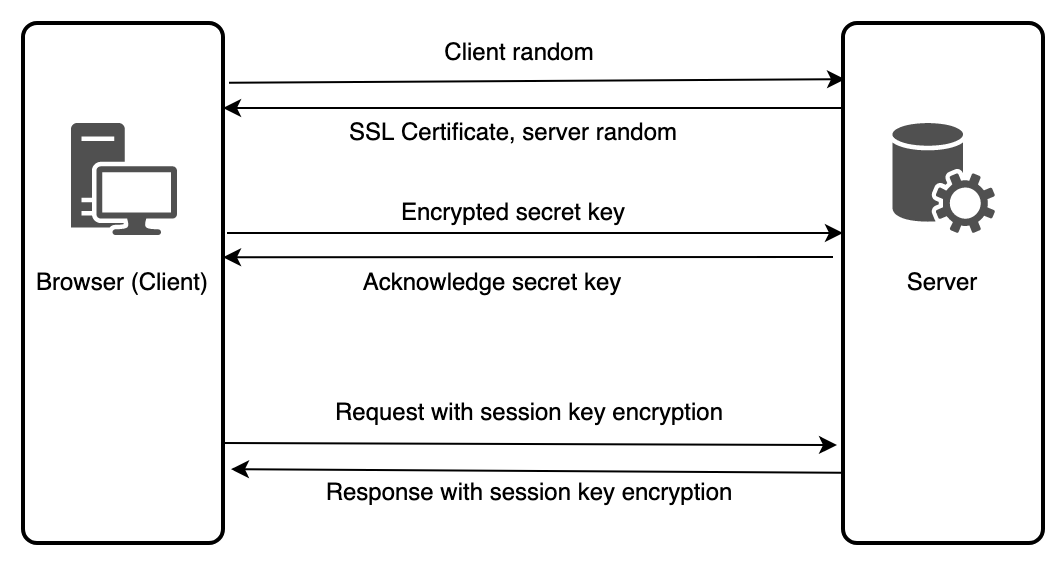
On the first touch point, the server hands over the SSL certificate. This SSL certificate will have a public key.
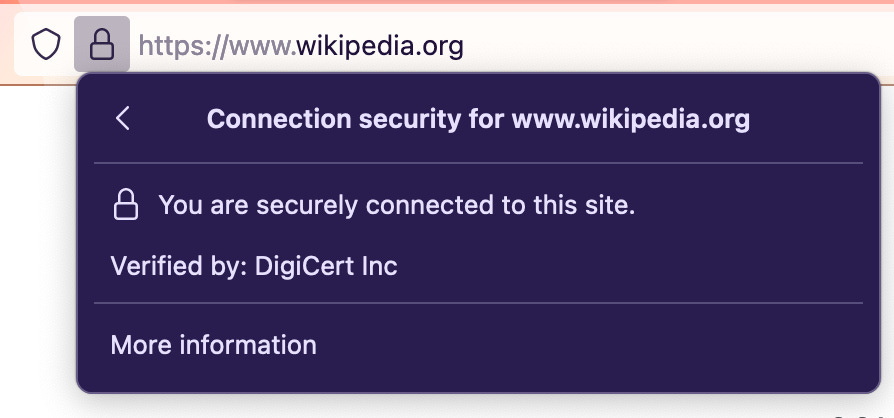
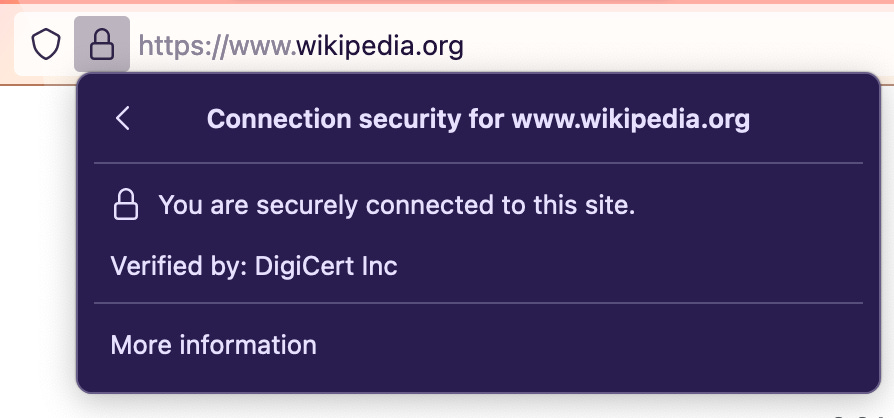
The browser validates if the SSL certificate is active and identifiable for the requested server. The SSL certificate is provided by the Certified Authority (CA), a trusted third-party organization. They digitally sign the SSL certificate with their private key and allow any clients (browser, in our case) to verify it. My Firefox browser shows the following information as the verification of the Wikipedia website.
After the confirmation, the browser generates a secret key and encrypts it with the public key of the SSL certificate.
Then the browser sends the encrypted version of the secret key to the server.
You may wonder how is it secure as the SSL certificate of the server is public and anyone will have access to.
Only the server who owns the SSL certificate can decrypt the encrypted version of the secret key. The server holds the private key corresponding to the public key. This private key can only decrypt the information encrypted with the public key. It’s called asymetric encryption or public-key encryption.
Now, the browser and server have a secret key that nobody else knows. With this secret key, client random previously received and server random previously are used to generate a session key. The browser will generate the same session key with the same information.
All the data transmitted uses this shared session key to encrypt and decrypt before the transaction. It’s called symmetric encryption.
So, we now know why a slight loading happens when we open an online application. It has to do all the processes to ensure it's done securely. It’s all taken care of by the browser and server automatically.
Then what can you and I do to ensure security?
Best security practices
Keep the SSL certificates active and renew them proactively.
Do not use self-signed SSL certificates; use CA-certified certificates for the clients to trust the server's identity.
Choose a reliable Certified Authority (CA) to acquire an SSL certificate.
Apart from the HTML file of the web application, the JavaScript, CSS, and image files also have to be served with the SSL/TLS connection. Do not use mixed content. Avoid using HTTP for them while the parent site is in HTTPS.
Mark the cookies secure by adding a Secure flag. It will enforce cookies only via HTTPS.
Keep yourself vigilant of new vulnerabilities in technologies you use and update the systems to prevent them.
Recommendation: [Video] TLS Handshake Explained by Computerphile (16:58 mins)