
Head and Body
Difference between network request header and body, purpose of them, and how to use them.

Isn’t the head part of the body? Yes, in biology, not in HTTP requests.
In the world of web development, understanding how network requests work is crucial. Whenever we access a webpage or interact with a web application, our device sends a request to the server. This request is composed of two parts: the header and the body. In this article, we will explore the difference between these two components, their purpose, and when they are used.
What is a network request header?
Have you ever wondered how our browsers decide to show the results of different web pages and links differently? It mostly shows a nice webpage for each website URL. What I mean is sometimes, it shows a JSON text, an image, or a PDF file. It’s the magic that browsers do. How do they do that?
The network request header is the initial part of a network request. It contains metadata about the request, such as the HTTP method used (e.g., GET, POST, PUT), the content type of the data being sent (e.g., JSON, XML), and information about the client making the request (e.g., user agent). Other fields may also be present, depending on the specific request type.
Headers are essential because they provide the context to the server about how to handle the incoming request. For example, the Accept header can be used to indicate the type of data the client can handle, while the Authorization header can be used to authenticate the user making the request. Headers are not encrypted, and their size is typically small, making them faster to transmit over the network.
So, back to the question? How does the browser decide how to display the content?
It’s the “Content-Type” header sent in the HTTP response that returns back from the server. The server has to send one of the official MIME types for all browsers to recognize the format and display them accordingly. For example, a “text/html” type is used for an HTML website for the browser to render an HTML page beautifully.
In the first version of HTTP 0.9, there were no headers present. It was called the one-line protocol. Only the supported HTTP method and the path is sent as a response URL, and the response is always an HTML document. It’s not used widely now. Most of the internet is upgraded to HTTP 1.1, HTTP 2.0, and HTTP 3.0. In the early times of HTTP 0.9, how would they have sent the response for an error? 🤔

What is a network request body?
If you go to https://en.wikipedia.org/wiki/HTTP page, everything you see on the page is sent in the request body. Yes, literally everything.
The request body is the second part of a network request. It contains the data sent to the server, such as form data, files, or JSON payloads. The body is optional, and not all requests will have one. The size of the body can vary greatly, depending on the type and amount of data being sent.
The body is typically encrypted using SSL/TLS. It enables the safe transmission of any data. Encryption is especially required when transacting with sensitive data, such as passwords or credit card information. Want to read more about this request encryption? Read one of my previous articles on it. However, it's important to note that even though the body is encrypted, it's still possible for attackers to intercept and manipulate the request.
Are headers and body necessary?
The headers are always necessary in the requests and response of a network request. For body, it depends on the type of the request, that we either send a request body. But, the response always contains a body.
For example, when making an HTTP GET request, we typically don't send any data to the server, so the request only contains headers. On the other hand, when making an HTTP POST request, we might send form data to the server so that the request will contain both headers and a body.
If I see the request data for https://en.wikipedia.org/wiki/HTTP webpage, it looks something like the following.
curl https://en.wikipedia.org/wiki/HTTP' -H 'Accept: text/html,application/xhtml+xml,application/xml;q=0.9,image/avif,image/webp,*/*;q=0.8' -H 'Connection: keep-alive'
In this request cURL, no request data is sent. The request is sent to the URL with the request type GET and some headers. Everything with the flag -H is a header in a key: value format.
For this request, the response looks something like this. (the body is trimmed for readability)
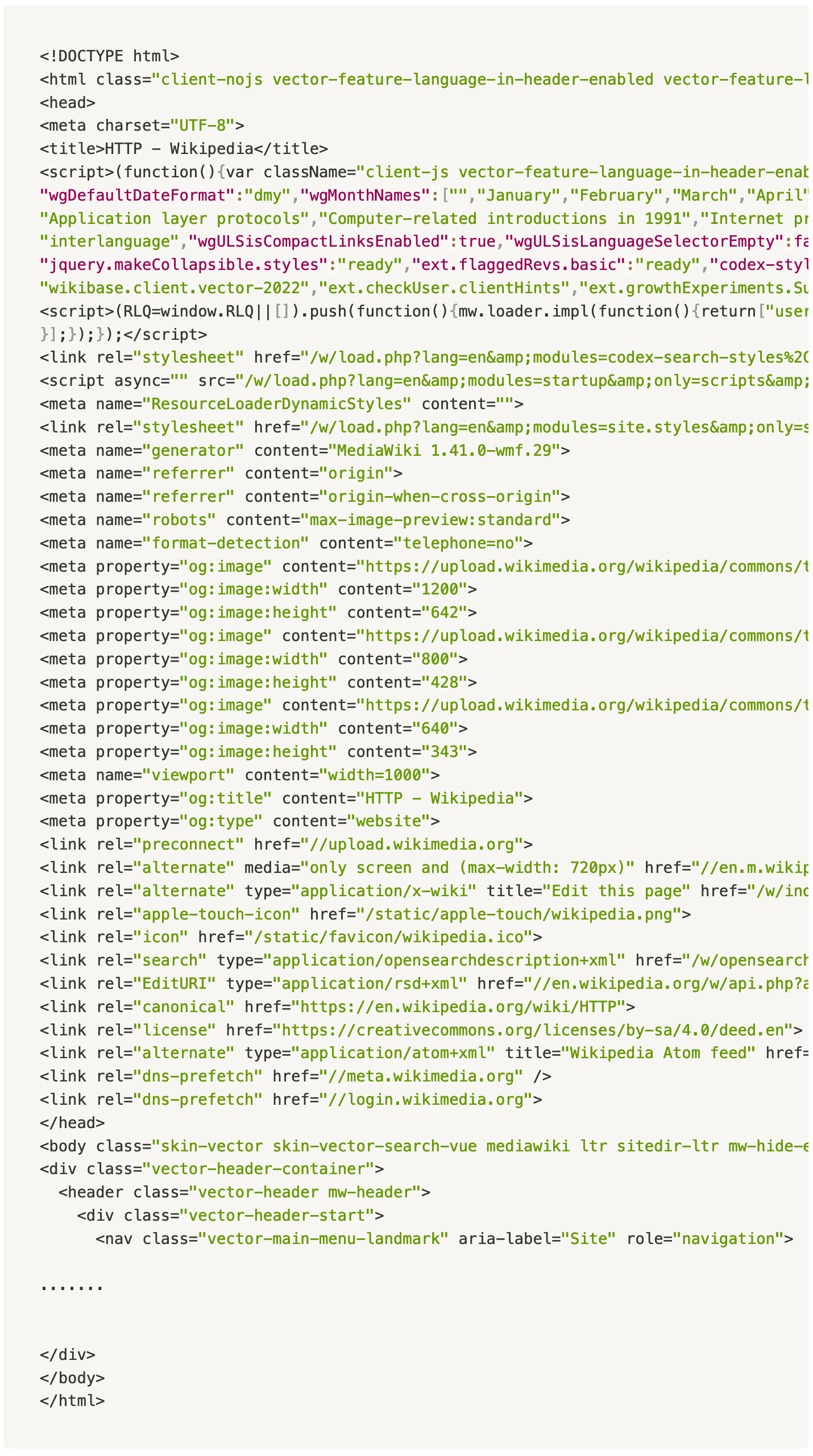
In this request’s response, an HTML is sent as a response. Additional headers are sent along in the HTML. The body contains the page data that has to be rendered. The body is so long that I had to trim it to avoid you scrolling forever.
Do headers and body contribute to the speed of network requests?
Headers are typically small in size so that they can be transmitted quickly over the network. However, too many headers can slow the request, as the server and the browser need to process each header. The size of the body can also impact the speed of the request. Large request and response body can take longer to transmit over the network, especially on slow or unstable connections. In addition, processing a large body can take more resources in the server. So, usually, the servers limit how much the request body and response body can be allowed, and they throw HTTP error code 413 intentionally if the request or response body crosses it. HTTP error code 431 is thrown for headers being large in HTTP requests.
Do you have more doubts about HTTP request headers and body? Let’s discuss them in the comment box.
P.S: When the 80/20 Rule Fails: The Downside of Being Effective by James Clear